Creating a TIN ground model
A new TIN ground model can be created from a variety of data sources, including:
- another TIN ground model
- a Grid ground model
- MapInfo MIF files containing point data
- ESRI Shape files
- Text files
To create a TIN Ground Model from other data:
- On the Model Group window or Explorer window, right click a Ground Model TIN group and choose New | Ground Model TIN from the context menu. This displays the Create New TIN Ground Model dialog.
- Enter a name for the new TIN ground model
- Choose the data from which the ground model will be generated (see below for more details). If conflicting points are found in the data, the data points will be prioritised so that points from data types further up this list will overwrite points from any data type below them on the list
- Existing ground models
- TIN ground model
- Grid ground model
- External data sources
- MapInfo MIF files
- ESRI Shape files
- Text files
- Click Create TIN to start the creation process
 Creating a TIN from an existing ground model
A new TIN can be created using an existing TIN or Grid ground model. These may be used in addition to external data sources.
On the Create New TIN Ground Model dialog:
- Drag and drop a TIN ground model into the Ground Model TIN box, or use the Browse button to browse for a TIN ground model.
- Drag and drop a Gridded ground model into the Ground Model Grid box, or use the Browse button to browse for a Gridded ground model.
- Click Create TIN to start the creation process
and / or
Converting Large Grid Ground Models
For Grid ground models containing a very large number of vertices, it may not be possible to create a TIN including all of the vertices present in the Grid due to memory limitations.
If there is insufficient memory to create a TIN from the selected Grid, a message will be displayed suggesting that the Grid resolution factor be increased.
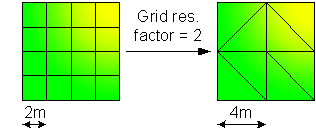
The Grid resolution factor is used to lower the resolution of the TIN ground model, where the Grid Res. Factor x Grid Base Cell size corresponds to the minimum size to be considered when importing values from the Grid ground model. The higher the grid resolution factor, the lower the TIN resolution and therefore the cruder the approximation to the original grid.
For example: if the Grid ground model has a base cell size of 2m and the Grid res. factor is set to 2, the TIN model vertices will be created at 4m intervals. In this case, height values will be the average of the values defined for the 4 base cells contained within the 4mx4m area.
InfoWorks WS Pro allows a maximum grid resolution factor of 100.
Creating a TIN from an external data source
To create a TIN from a MapInfo MIF file, ESRI Shape file or text file:
- Click the Add button
on the Create New TIN
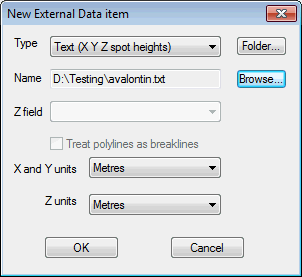
Ground Model dialog. This will display the New
External Data Item dialog. Show image
- Select the type of file containing data from which the ground model will be generated and Browse for the file to be used. The path will be displayed in the Name field
- MIF file (points): contains x, y points. Select the field in the table containing z values from the Z field dropdown list
- Shapefile (points): contains x, y points. Select the field in the table containing z values from the Z field dropdown list
- Shapefile (pointZ): contains x, y, z points.
- Shapefile (polylineZ): contains x, y, z polylines. The points that make up the polylines will be used to create the TIN. Check the Treat polylines as breaklines box to enforce the polylines as TIN edges
- Text (X Y Z spot heights): contains points data used to create the TIN. The file format is three values (x y z) per line defining each point
- Text (X Y Z polylineZ): format is similar to the Text (X Y Z spot heights) file, except the file has a line reading ENDLINE defining the end of each polyline. Check the Treat polylines as breaklines box to enforce the polylines as TIN edges
- Select X, Y and Z units from the dropdowns
- Click OK to return to the Create New TIN Ground Model dialog
- Click Create TIN to start the creation process